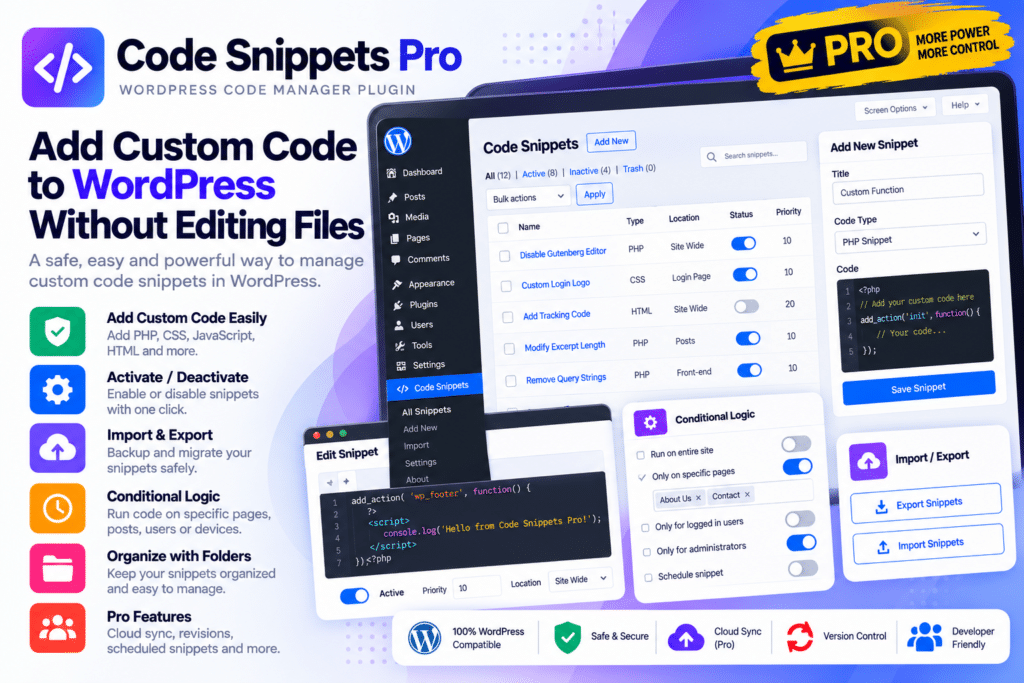
Instead of placing custom PHP inside functions.php or maintaining code across multiple files, you can create, organize, activate, disable, and manage snippets from a dedicated WordPress interface.
The Pro version expands the workflow with multiple snippet types, conditional execution, cloud storage, AI-assisted coding, synchronization, developer tools, and advanced management features.
Key Features
- PHP Snippets – Add custom WordPress functionality without directly modifying theme files.
- CSS Snippets – Manage custom website styling from the Code Snippets interface.
- JavaScript Snippets—Add supported frontend functionality and interactive behavior.
- HTML & Content Snippets – Create reusable content that can be inserted into supported WordPress areas.
- Conditional Logic – Define exactly when and where selected snippets should execute.
- Snippet Revisions – Keep revisions whenever snippets are saved and restore earlier versions when needed.
- Security Scanning – Scan PHP snippets for potentially risky code patterns when saving.
- Performance Tracking—Monitor supported PHP snippet execution time to help identify slower custom code.
- AI Agent—Generate, explain, review, and work with snippets using supported AI functionality.
- Private Cloud Library – Store and manage private snippets through the Code Snippets cloud platform.
- Cross-Site Synchronization—Sync supported snippets between connected WordPress websites.
- Snippet Bundles – Organize multiple snippets together for easier deployment and management.
- Elementor Integration – Insert supported content snippets using the available Elementor widget.
- Developer Tools—Access supported REST API, WP-CLI, multisite, import/export, and file-based execution workflows.
Perfect For
Code Snippets Pro is suitable for WordPress developers, agencies, freelancers, WooCommerce developers, website administrators, theme customizers, client websites, multisite networks, and anyone regularly adding custom PHP, CSS, JavaScript, or HTML to WordPress.
Customize WordPress Without Editing Theme Files
Custom WordPress functionality is often added directly to a theme’s functions.php file. This can make customizations harder to organize and creates additional work when themes are changed or troubleshooting is required.
Code Snippets Pro gives each customization its own manageable snippet. Individual snippets can be enabled or disabled independently, making custom functionality easier to organize and test.
You can also control execution order and use supported conditions to decide where particular snippets should run.
Manage Snippets Across Multiple Websites
For freelancers and agencies, repeating the same customizations across several WordPress installations can be time-consuming.
Code Snippets Pro includes private cloud storage and syncing features that let you maintain reusable snippets and deploy them across connected websites. Bundles can group related snippets together, providing a more organized workflow for commonly used WordPress customizations.
Safer Code Editing & Recovery
Code Snippets 4.0 introduced additional tools for managing code changes.
Every supported save can become a revision, allowing you to compare changes and restore a previous version. PHP snippets can also be scanned for potentially risky patterns, while performance tracking can highlight snippets that take longer to execute.
These tools can make custom-code management easier, though they do not replace proper testing, backups, or code review.
Take Control of Your WordPress Custom Code
Manage custom functionality with Code Snippets Pro—WordPress Code Snippets Manager.
With PHP, CSS, JavaScript, and HTML snippets, conditional logic, AI tools, revisions, security scanning, cloud synchronization, Bundles, Elementor integration, REST API, and WP-CLI support, Code Snippets Pro provides a powerful environment for managing WordPress custom code.