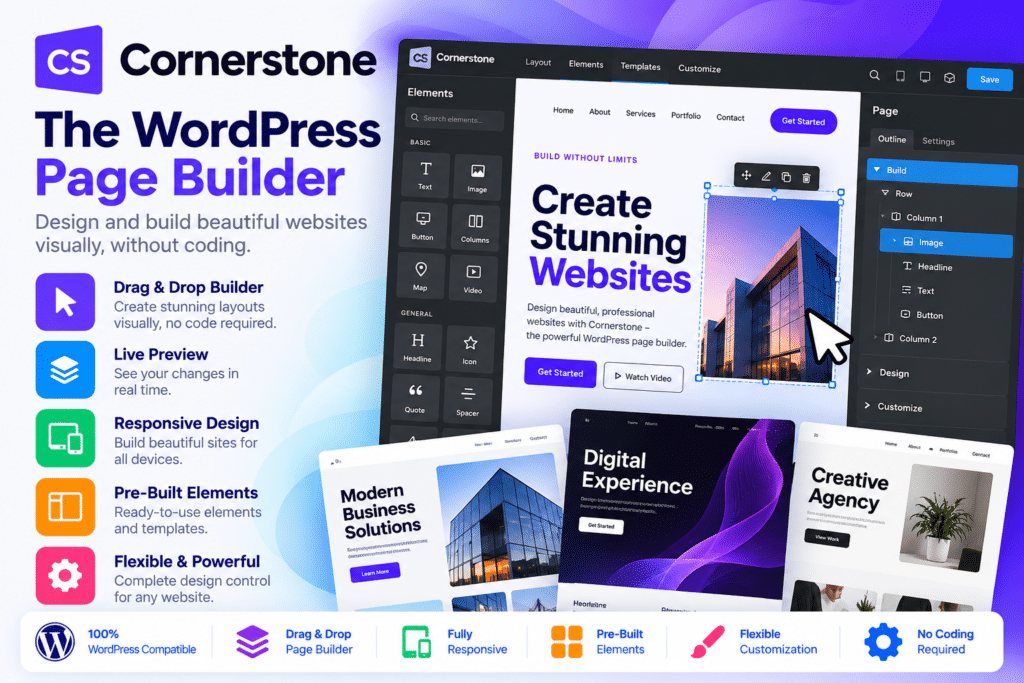
Cornerstone is a visual WordPress page builder developed by Themeco that lets you design custom website pages using a live, drag-and-drop editing interface. It combines flexible layout controls, a large library of design elements, responsive styling, reusable components, and dynamic content tools to help you create professional websites with less reliance on custom code.
Whether you’re building a business website, agency portfolio, landing page, blog, or client project, Cornerstone provides tools for arranging content, customizing typography, managing colors, and refining layouts directly within WordPress.
The builder includes controls for CSS Grid and Flexbox layouts, interactive elements, global design settings, and dynamic content from WordPress data. Advanced users can also work with custom CSS, JavaScript, conditional logic, query loops, and external API integrations.
Cornerstone is designed to accommodate both beginners who prefer visual editing and developers who want more control over website structure and styling. Its component system also helps teams create reusable design patterns, making it easier to maintain consistency across multiple pages.
The standalone Cornerstone plugin can be used with compatible WordPress themes. However, its available builders differ from those included in Themeco’s Pro theme, so it’s important to choose the appropriate product for your website-building requirements.
What You’re Getting
Cornerstone provides a visual workspace for creating and customizing page content without manually writing every layout element. You can combine text, images, buttons, containers, sliders, forms, and other supported elements to build pages that suit your website’s purpose.
The builder also offers reusable components and dynamic content features that can reduce repetitive design work. For developers, its code editors and advanced controls provide additional flexibility when standard visual settings aren’t enough.
Key Features
- Visual Drag-and-Drop Builder – Design pages through a live editing interface that lets you arrange content and adjust styling while viewing your layout.
- 100+ Native Elements – Build pages using supported elements for text, images, buttons, sliders, accordions, tabs, galleries, and other common website components.
- Flexible Layout Controls – Use CSS Grid, Flexbox, containers, and spacing controls to create structured layouts for different types of content.
- Responsive Design Tools – Customize layouts, typography, spacing, and element visibility for supported desktop, tablet, and mobile breakpoints.
- Live Content Editing – Edit supported text and design settings while previewing the page, helping you evaluate changes in context.
- Reusable Components – Save frequently used design patterns as components and update their shared design in one place.
- Component Parameters – Create configurable components with supported parameters, making reusable sections easier to adapt for different pages.
- Global Color Management – Define reusable brand colors and apply them throughout supported designs.
- Global Font Management – Configure reusable typography settings using supported system fonts, Google Fonts, Adobe Fonts, and custom fonts.
- Dynamic Content Integration – Display supported WordPress data, including post information, custom fields, taxonomies, user data, and other available sources.
- Query Builder and Loopers – Retrieve and display content dynamically, with support for configured queries and nested loops.
- Conditional Visibility – Show or hide supported elements based on configured conditions, such as content values or dates.
- External API Integration – Retrieve supported data from external API endpoints and use it through the builder’s dynamic content controls.
- Native Form Building – Use the available Cornerstone Forms functionality to create supported forms and configure their actions, validations, and integrations.
- Custom CSS and JavaScript – Add custom code at supported element, page, or global levels for more advanced design and behavior.
- Visual Effects and Animations – Configure supported hover, scroll, and animation effects to create more interactive interfaces.
- Template Management – Save and reuse supported page designs and templates to streamline future projects.
- HTML Structure Controls – Adjust supported HTML tags and element structure to create more deliberate page markup.
- WordPress Plugin Integrations – Work with compatible tools such as Advanced Custom Fields, WooCommerce, Gravity Forms, WPForms, Contact Form 7, and popular SEO plugins, depending on the integration and selected product.
- Developer-Friendly Controls – Access advanced fields and code-oriented settings when a project requires greater control than standard visual editing provides.
- Customizable Builder Interface – Adjust supported interface preferences and workspace settings to suit your workflow.
Design Professional WordPress Pages Visually
Creating a polished website often involves arranging multiple sections, balancing typography, choosing appropriate spacing, and ensuring that each element fits the overall design.
Cornerstone brings these tasks into a visual editing environment. You can create hero sections, service blocks, feature grids, testimonials, calls to action, image galleries, and other page sections using the available elements and layout controls.
For example, a business website might use a prominent hero section followed by services, customer testimonials, and a contact form. A portfolio website could feature image grids, project descriptions, and links to individual case studies.
You can refine individual elements while maintaining control over the overall layout. This makes Cornerstone useful for creating custom page designs without having to build every section from scratch.
Create Consistent Designs with Reusable Components
When a website contains many pages, repeating the same layout and styling manually can make updates time-consuming. Cornerstone’s component system helps address this by allowing you to create reusable design patterns.
You can build a section once and reuse it across supported locations. When you update a shared component, its changes can be reflected in the instances that use it.
This is particularly useful for agency websites, business landing pages, service sections, call-to-action blocks, and other recurring design elements.
Components can also support more structured design workflows when combined with parameters. Instead of maintaining multiple nearly identical sections, you can create a reusable pattern and adapt its supported settings for different uses.
Build Dynamic Pages with WordPress Data
Static content isn’t always enough for websites that publish frequently or rely on custom fields. Cornerstone’s dynamic content tools let you use supported WordPress data to populate page elements.
Depending on the data source and configuration, you can display post titles, featured images, custom-field values, taxonomies, author information, and other supported content.
The query and looper tools can help you display collections of content dynamically. For instance, you could build a grid of recent articles, a portfolio listing, or a section that displays selected records from your WordPress site.
Advanced users can also use conditional logic and external API integrations to create more tailored layouts. These capabilities are particularly helpful for content-heavy websites and projects that depend on structured data.
Dynamic content depends on the availability and configuration of the underlying WordPress data, custom fields, plugins, and external services.
Create Responsive Layouts for Different Devices
A website should remain usable across desktop computers, tablets, and mobile phones. Cornerstone provides responsive styling controls that let you adapt supported elements and layouts to different screen sizes.
You can adjust spacing, font sizes, alignment, columns, and visibility settings for supported breakpoints. This makes it possible to refine the same page for different viewing environments instead of relying on one fixed desktop design.
For example, a multi-column desktop section might use a stacked layout on mobile, while a large heading could use smaller typography on narrow screens.
Responsive settings should always be tested on real devices or suitable browser previews. Good mobile presentation also depends on image sizes, content length, navigation, accessibility, and the behavior of third-party integrations.
Extend Your Workflow with Forms and Integrations
Cornerstone includes form-building functionality for supported workflows, allowing you to create forms and configure available actions and validation settings.
This can be useful for contact forms, enquiries, lead-generation pages, and other common business website requirements. Depending on your setup, you can also use integrations with compatible form plugins and other WordPress tools.
The builder works alongside a wider WordPress ecosystem that can include Advanced Custom Fields, WooCommerce, SEO plugins, and external services. The exact functionality available depends on the integration, installed plugin versions, and whether you are using the standalone builder or the Pro theme.
For websites that collect personal information, make sure forms include suitable consent notices, privacy information, spam protection, and secure data-handling practices.
Who Should Use Cornerstone?
Cornerstone can be a useful option for:
- Small business owners who want to create customized service and company pages.
- Freelancers and designers building visually distinctive WordPress websites.
- Web development agencies that need reusable design components across client projects.
- Bloggers and publishers who want more control over page layouts and content presentation.
- Landing-page creators building campaign pages, lead-generation sections, and calls to action.
- Portfolio website owners who want to showcase projects using custom grids and layouts.
- WordPress developers who need dynamic content, conditional logic, and custom code controls.
- Content-heavy websites that use custom fields, structured data, and dynamic listings.
Compatibility and Setup Notes
Cornerstone is a WordPress builder rather than a complete hosting or website-management service. Before installing it, consider the following:
- WordPress requirements: Check the current official requirements and compatibility information for your WordPress and PHP versions.
- Standalone plugin versus Pro: The standalone Cornerstone plugin provides Page Builder and Component Builder functionality. The full Layout Builder, Header Builder, Footer Builder, Blog Builder, and related full-site tools are available through the Pro theme.
- X theme users: Cornerstone functionality is included in the X ecosystem, but the available feature set differs from Pro.
- Forms: Confirm which Cornerstone Forms features and integrations are included in your specific package and release.
- Third-party plugins: Integrations with WooCommerce, custom-field tools, form plugins, and SEO plugins depend on compatible versions and configuration.
- External APIs: API-based dynamic content may require credentials, appropriate permissions, and compliance with the provider’s usage limits.
- Custom code: Incorrect CSS or JavaScript can affect page appearance, functionality, or performance. Test customizations before publishing them.
- Performance: Actual site speed depends on hosting, image optimization, caching, scripts, plugins, and page complexity. A page builder alone cannot guarantee a particular PageSpeed or Core Web Vitals score.
- Accessibility: Review heading structure, keyboard navigation, color contrast, form labels, and other accessibility requirements when building pages.
- Updates and licensing: Use a trusted, current release and verify the applicable license, update access, and support entitlements.
Themeco’s October 26, 2026 release notes list Cornerstone 7.9.8 alongside related X and Pro releases. Check the official changelog for the latest fixes and features before installing or updating the builder.
Build Flexible WordPress Websites with Cornerstone
Cornerstone – The WordPress Page Builder combines visual editing, flexible layouts, reusable components, dynamic content, responsive styling, and developer-focused controls in one WordPress design tool.
Whether you’re creating a business website, building custom landing pages, or developing reusable layouts for client projects, Cornerstone provides tools to turn design ideas into working page layouts while leaving room for more advanced customization.
Choose the appropriate Cornerstone product for your needs, configure the required integrations, and use its visual and dynamic content features to create a website that reflects your brand and workflow.