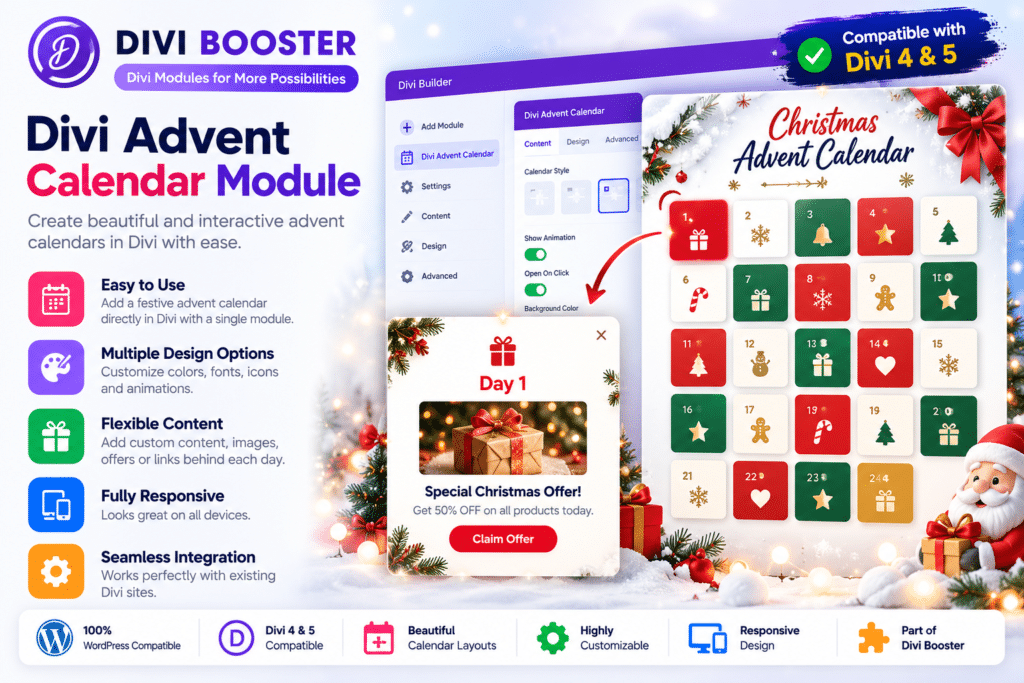
Divi Advent Calendar Module by Divi Booster is a seasonal WordPress plugin designed specifically for Divi websites.
It adds an Advent Calendar module directly to the Divi Builder, allowing you to create interactive calendars where visitors unlock a new door according to a scheduled date.
Behind each door you can place a gift, promotional link, discount, free download, special article, image, or other content, making it useful for Christmas campaigns, daily promotions, giveaways, and other time-based marketing experiences.
Key Features
- Native Divi Module – Add an Advent Calendar directly through the Divi Builder.
- Timed Door Unlocking – Automatically control when each calendar door becomes available.
- Past Door Access – Previously available doors can remain visible to visitors after their date passes.
- Future Door Locking – Keep future rewards unavailable until their scheduled day.
- Interactive Door Animation – Visitors can click the current day’s door to reveal its content.
- Custom Gift Text – Add a different promotional message or reward behind each door.
- Custom URLs – Link individual gifts to landing pages, downloads, offers, articles, or external destinations.
- Door Images – Add custom backgrounds and images to individual calendar doors.
- Reveal Images – Display images behind doors when they are opened.
- Calendar Background Controls – Use colors, gradients, or images for the overall calendar design.
- Custom Door Styling – Adjust typography, borders, backgrounds, dimensions, and other Divi design settings.
- Configurable Start Date – Decide when the first calendar door becomes available.
- Responsive Mobile Layout – Display doors in a more suitable arrangement on smaller screens.
- Randomized Door Order – Shuffle door positions while preserving the same arrangement for a given calendar and year.
Perfect For
Divi Advent Calendar Module is suitable for WooCommerce stores, bloggers, agencies, membership websites, online communities, course creators, affiliate websites, digital-product sellers, nonprofits, and businesses running Christmas or seasonal promotional campaigns.
Create an Advent Calendar Inside Divi
Once installed, the plugin adds an Advent Calendar module to the Divi Builder.
You can place the module inside a normal Divi section or row and then configure the calendar using the familiar Divi settings interface.
A calendar title can be customized and styled through Divi’s Design controls, while the overall calendar can use a solid color, gradient, or image background.
Add Individual Calendar Doors
Each day is created as an individual Advent Calendar Door item.
You can add as many doors as needed for your campaign and configure each door independently.
For a traditional Christmas campaign, this could be used for:
- December 1–24
- December 1–25
The same system could also be adapted for shorter promotional campaigns or other date-based events.
Reveal Daily Gifts & Promotions
Behind each calendar door you can add a short piece of text and a destination URL.
For example, individual days could reveal:
- Coupon codes
- Free downloads
- Special products
- Blog posts
- Member resources
- Giveaways
- Christmas offers
- Exclusive tutorials
- Digital gifts
- Limited-time landing pages
Divi Booster implements the revealed gift similarly to a Divi button, giving you access to familiar button styling controls.
Add Images Behind Calendar Doors
The plugin supports images inside the revealed door content.
You can configure one default image for multiple doors or assign a different image to an individual door.
This can be useful for showing:
- Product images
- Christmas artwork
- Discount graphics
- Gift previews
- Brand illustrations
- Daily promotional images
Individual door background-image support was added beginning with version 1.0.1.
Control When Doors Open
The calendar uses a configurable start date to determine which doors visitors can access.
A typical Christmas calendar could begin at midnight on December 1.
The plugin uses the timezone configured under your WordPress general settings.
Visitors can see previous days as already opened, access the current day’s door, and must wait before opening future doors.
Randomize Door Positions
Version 1.1 introduced a Randomize Door Order option.
Instead of displaying every door sequentially, such as 1, 2, 3, 4, the calendar can shuffle their physical positions.
The randomized arrangement is generated using the post ID and current year, which means the arrangement remains stable for the visitor rather than changing every time the page reloads.
When randomization is disabled, doors remain in numerical order.
Customize Door Sizes
Individual calendar doors use Divi’s standard sizing controls.
You can adjust supported width and height settings and then use Divi’s Extend Item Styles functionality to apply matching dimensions to additional doors.
This helps you create larger or smaller calendar designs that better fit your page layout.
Responsive Mobile Calendar
Divi Advent Calendar includes responsive behavior for smaller displays.
Beginning with version 1.0.2, calendars occupying most of the available screen width can display two doors side by side instead of stretching one door across an entire mobile row.
This helps preserve the traditional grid-style appearance of an advent calendar on mobile devices.
Create Seasonal Marketing Campaigns
The plugin does not have to be used only for free Christmas gifts.
Businesses can create promotional campaigns around daily offers such as:
- Daily WooCommerce deals
- Affiliate promotions
- Discount codes
- Member bonuses
- Course resources
- Daily challenges
- Email signup incentives
- Holiday giveaways
This makes the module useful for encouraging visitors to return regularly during a campaign.
Part of the Divi Booster Plugin Ecosystem
Divi Advent Calendar is available as part of Divi Booster’s broader plugin ecosystem and is currently included in several Divi Booster plugin bundles.
Divi Booster positions it as a plugin for interactive promotions and seasonal campaigns.
Create an Interactive Divi Christmas Calendar
Add engaging seasonal promotions with Divi Booster | Divi Advent Calendar Module.
With scheduled doors, daily gifts, custom links, images, randomized layouts, responsive mobile presentation, configurable styling, and native Divi Builder integration, Divi Advent Calendar provides a simple way to create interactive holiday campaigns directly inside Divi.