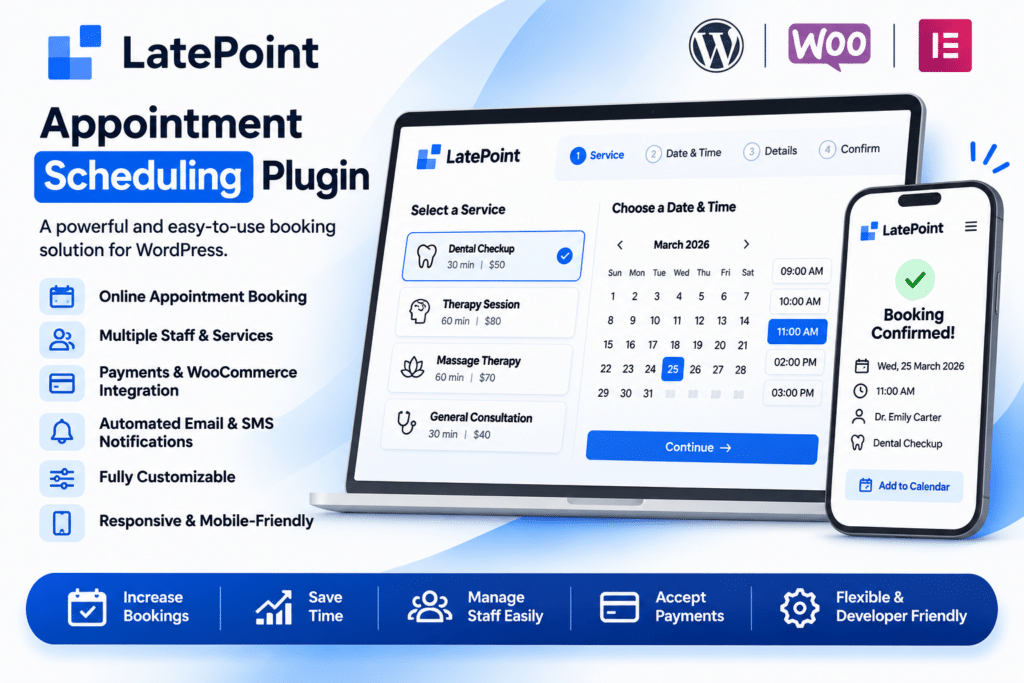
LatePoint is a powerful WordPress appointment booking and reservation plugin designed to help businesses manage appointments, schedules, staff members, and customer bookings from one centralized dashboard.
With its intuitive booking interface, customers can easily explore available services, select their preferred appointment time, choose a staff member, and submit their booking without complicated steps. Businesses can manage reservations, organize schedules, and automate important booking communications directly from their WordPress website.
LatePoint also supports payment integrations, customizable booking forms, automated notifications, and flexible scheduling options. Whether you operate a salon, healthcare clinic, consulting business, fitness studio, or freelance service, LatePoint provides a convenient way to manage your appointment booking process.
Key Features
1. User-Friendly Appointment Booking Interface
Provide customers with a smooth booking experience through an intuitive appointment scheduling interface. Visitors can select a service, choose an available time slot, enter their details, and complete their booking through a straightforward process.
2. Customizable Booking Forms
Customize booking forms to collect the information your business needs. Add relevant customer details and tailor the booking experience to different services or business requirements.
3. Online Payment Integration
Accept payments during the appointment booking process through supported payment gateway integrations. This allows businesses to collect payments or booking fees online instead of handling every transaction manually.
Available payment methods depend on the installed integrations and configuration.
4. Automated Email Notifications
Keep customers and staff informed with automated booking notifications. Send important updates about new appointments, booking confirmations, cancellations, and other scheduling events.
5. Flexible Scheduling Options
Configure appointment availability according to your business hours, working days, and scheduling requirements. LatePoint provides flexible scheduling controls to help businesses organize appointments more efficiently.
6. Recurring Appointments
Support recurring appointment workflows for services that customers need regularly. This is useful for ongoing consultations, training sessions, coaching programs, and other repeat-service arrangements.
7. Multiple Staff Member Management
Manage appointments for multiple employees or service providers from one WordPress dashboard. Assign staff members to relevant services and organize their availability to support team-based booking operations.
8. Real-Time Availability Updates
Display available appointment slots based on configured schedules and existing bookings. Availability updates help prevent scheduling conflicts and reduce the risk of double bookings.
9. Service Management
Organize the services your business offers and allow customers to select the service they need during the booking process. Configure service information and scheduling options according to your business requirements.
10. Appointment Management Dashboard
Manage customer reservations from the WordPress administration area. Review upcoming appointments, check booking details, and organize scheduling activities without relying entirely on manual booking records.
11. Mobile-Friendly Booking Experience
LatePoint provides a responsive booking interface designed for desktop, tablet, and mobile devices. Customers can schedule appointments conveniently from their smartphones without needing to use a desktop computer.
12. Customer Information Management
Keep customer booking information organized and accessible through the administration dashboard. Review appointment details and customer records to make ongoing service management easier.
13. Staff Scheduling and Availability
Configure individual staff schedules and manage their appointment availability. This is particularly useful for salons, clinics, agencies, and businesses where multiple professionals provide different services.
14. Streamlined Booking Workflow
Guide customers through the essential booking steps, from selecting a service to choosing a suitable appointment time and submitting their details. A structured process helps make online scheduling easier to understand.
15. Suitable for Different Service Businesses
LatePoint can be adapted to a wide range of appointment-based businesses, including:
- Beauty salons and spas
- Medical and healthcare clinics
- Psychologists and therapists
- Fitness studios and personal trainers
- Consultants and freelancers
- Coaching and training businesses
- Photography studios
- Educational institutions
- Repair and maintenance services
- Professional service providers
16. Centralized Appointment Management
Bring customer bookings, staff schedules, service information, and appointment updates together in one WordPress-based management system. This helps reduce dependence on separate scheduling tools and manual appointment tracking.
Simplify Online Appointment Booking with LatePoint
LatePoint gives WordPress businesses a convenient way to accept and manage appointments directly through their websites. With customizable booking forms, online payment integrations, automated notifications, recurring appointment options, staff management, and responsive booking pages, it provides a flexible solution for service-based businesses. Whether you manage a single-person consultancy or a team of professionals, LatePoint helps organize your booking workflow and makes it easier for customers to schedule services online.