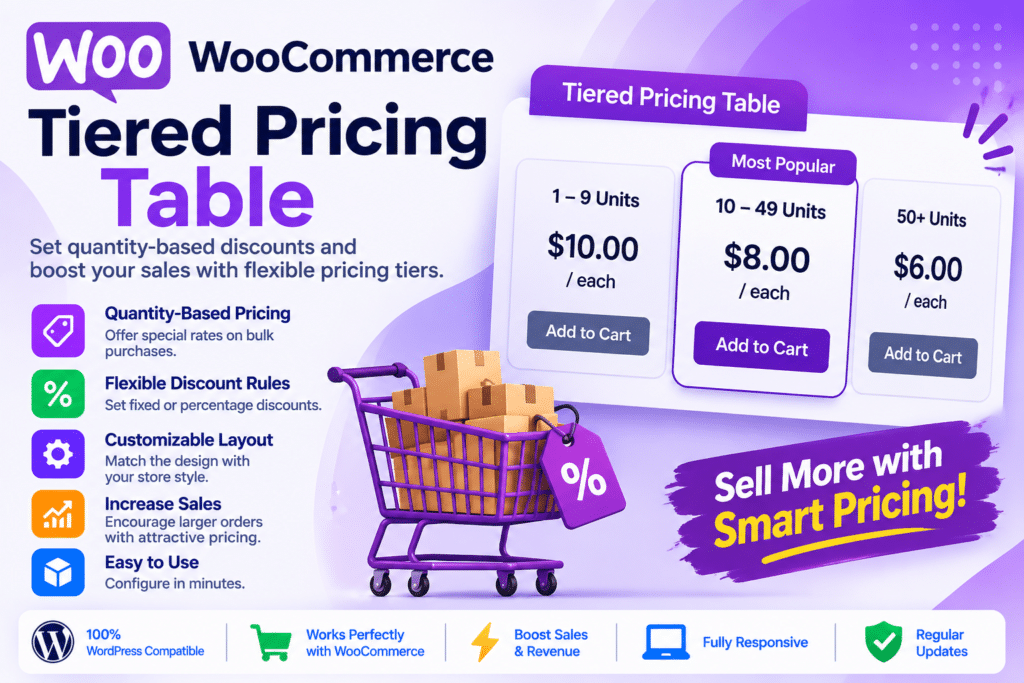
Tiered Pricing Table for WooCommerce is a pricing and discount plugin that helps online store owners offer different product prices based on purchase quantities, customer roles, and individual customer accounts. Developed by u2code, it provides flexible pricing rules that encourage customers to purchase larger quantities while giving businesses greater control over wholesale and B2B pricing.
Instead of offering the same unit price to every customer, you can create quantity-based discounts such as 5% off when purchasing 5 items or 15% off when ordering 20. The plugin displays these pricing tiers on product pages, helping shoppers understand available discounts before adding products to their carts.
It also includes customizable pricing layouts, dynamic price calculations, global pricing rules, minimum and maximum quantity controls, and integrations with popular WooCommerce extensions. For businesses serving wholesale customers, additional functionality supports role-based pricing, private product catalogs, wholesale registration, and customer-specific discounts.
Whether you operate a retail store, wholesale business, B2B marketplace, manufacturing company, or bulk-product shop, Tiered Pricing Table provides tools to create more flexible pricing strategies within WooCommerce.
What You’re Getting
The plugin combines quantity-based pricing with customizable product displays and advanced pricing management tools. You can configure different discount levels for individual products or apply broader pricing rules across selected products and categories.
Customers can see how much they save when purchasing larger quantities, while administrators can manage pricing structures according to their store’s sales strategy.
Key Features
- Quantity-Based Discounts – Offer different product prices or discounts depending on the number of items purchased.
- Percentage Discounts – Configure percentage-based savings for different quantity levels, such as 5%, 10%, or 20% off.
- Fixed Tiered Prices – Set specific unit prices for different purchase quantities instead of calculating discounts from the regular price.
- Customizable Pricing Tables – Display quantity-based offers using seven supported layouts, including tables, blocks, options, dropdowns, horizontal tables, plain text, and tooltips.
- 30 Design Styles – Choose from available styling presets and customize colors, labels, and other presentation settings.
- Live Price Updates – Automatically update displayed prices and totals when customers change product quantities.
- Dynamic Savings Display – Show discount percentages, total savings, and other pricing information to make bulk offers easier to understand.
- Variable Product Support – Apply tiered pricing to WooCommerce variable products and, with the appropriate configuration, combine quantities across variations.
- Role-Based Pricing – Set different product prices and discount tiers for customer roles such as wholesale buyers, retailers, and regular customers.
- Customer-Specific Pricing – Configure special prices and quantity discounts for selected individual customers.
- Global Pricing Rules – Apply pricing rules to selected products, categories, tags, brands, or the entire store.
- Scheduled Pricing Rules – Configure start and end dates for promotional pricing campaigns and seasonal offers.
- Minimum Order Quantity – Require customers to purchase a minimum number of items before completing an order.
- Maximum Order Quantity – Set upper purchase limits for individual products or applicable pricing rules.
- Quantity Step Controls – Require customers to purchase products in specific quantity increments, such as packs of 6, 12, or 24.
- Mix & Match Pricing – Combine quantities across eligible products or variations to reach a discount threshold.
- Shop Page Price Display – Show the lowest available tier price or a price range on product catalog and category pages.
- Bulk Savings Badges – Highlight available discounts with promotional labels on product listings.
- Cart Upsell Messages – Encourage customers to purchase additional quantities with messages such as “Add 2 more to save 15%.”
- Cart Savings Summary – Display applicable savings and pricing information in the shopping cart.
- Wholesale Registration – Allow potential wholesale customers to submit applications for account approval through supported registration workflows.
- Private Store Controls – Restrict product visibility, prices, and purchasing access to selected customer roles.
- Role-Based Cart Rules – Configure minimum order amounts, quantity requirements, and supported payment or shipping options for different customer groups.
- Request a Quote – Allow customers to request custom pricing for larger orders through configurable quote forms.
- Shortcode Support – Display pricing tables in supported locations using the
[tiered-pricing-table]shortcode. - Elementor and Gutenberg Integration – Add pricing displays using the available Elementor widget and Gutenberg block.
- WooCommerce REST API Support – Access supported tiered pricing information through the extended WooCommerce REST API.
- Import and Export Compatibility – Transfer supported tiered pricing data using WooCommerce import/export tools and compatible WP All Import workflows.
Encourage Customers to Buy More with Quantity Discounts
Bulk discounts can be an effective way to increase average order value and encourage repeat purchases. Customers purchasing several units often expect better pricing than those buying a single item.
Tiered Pricing Table lets you create quantity-based offers that reward larger orders. For example, an online store could configure the following pricing structure:
- Buy 1–4 units: Regular price.
- Buy 5–9 units: 5% discount.
- Buy 10–19 units: 10% discount.
- Buy 20 or more units: 15% discount.
These are illustrative pricing examples; you can configure your own quantities and discount values.
The plugin can display the available tiers directly on product pages, helping customers compare prices and understand how increasing their order quantity affects the final cost.
You can use percentage-based discounts or define fixed unit prices for specific quantities, depending on your business requirements.
Create Custom Pricing Tables for Product Pages
Displaying bulk discounts clearly is important because customers should understand the available offers before making a purchase.
Tiered Pricing Table offers seven presentation layouts, including traditional tables, pricing blocks, selectable options, dropdowns, horizontal tables, plain-text displays, and tooltips.
You can customize supported titles, labels, colors, and styling options to match your store’s design. The layout configurator also provides a live preview, making it easier to review the appearance before publishing changes.
The pricing table can show information such as quantity thresholds, unit prices, discount percentages, and savings. Depending on the selected layout, customers can also interact with pricing options to update the product quantity.
This helps turn bulk discounts into a visible part of the shopping experience rather than hiding them in product descriptions or separate promotional pages.
Offer Different Prices to Wholesale and Retail Customers
Not every customer should necessarily receive the same pricing. Wholesale businesses often need different rates for distributors, retailers, business buyers, and individual customers.
Tiered Pricing Table provides role-based and customer-specific pricing options to support these requirements.
You can configure different pricing tiers for selected WordPress user roles or assign negotiated prices to individual customers. Global pricing rules make it possible to apply these settings across multiple products or categories instead of configuring every item separately.
For example, a manufacturer could offer standard retail prices to regular visitors, discounted prices to approved wholesale accounts, and custom rates to selected business partners.
Role-based tax controls also provide additional flexibility for eligible wholesale workflows. Tax configuration should always be reviewed against applicable local tax rules and professional accounting guidance.
Manage Wholesale and B2B Pricing
Businesses selling products in bulk often need more than simple quantity discounts. They may also require customer approval, private product catalogs, and minimum order requirements.
Tiered Pricing Table includes wholesale and B2B functionality that can help manage these workflows.
Depending on the configuration, you can:
- Allow visitors to apply for wholesale accounts.
- Approve or reject wholesale registration requests.
- Assign approved customers to the appropriate user role.
- Display different pricing for wholesale and retail customers.
- Restrict selected products or categories to specific roles.
- Hide prices or purchasing options from guests.
- Set minimum order amounts and quantity requirements.
- Configure supported payment and shipping methods for different customer groups.
These features can help create a more organized B2B shopping experience without maintaining separate retail and wholesale websites.
Increase Cart Value with Smart Upsell Messages
Customers sometimes purchase fewer products simply because they do not realize that ordering a slightly larger quantity would unlock a better price.
The plugin includes cart upsell messaging that can highlight the next available discount tier. For example, a customer purchasing 8 units could see a message explaining that adding 2 more units would unlock a higher discount.
Supported cart features can also display savings summaries and progress toward the next quantity threshold.
These prompts help customers understand the financial benefit of increasing their order size while keeping the shopping process within the existing WooCommerce cart.
Set Minimum, Maximum, and Quantity Step Rules
Some products are more practical to sell in specific quantities. Packaging materials, wholesale supplies, food products, and manufacturing components may require minimum order sizes or fixed quantity increments.
Tiered Pricing Table provides quantity controls that help store owners manage these requirements.
You can configure minimum quantities, maximum purchase limits, and quantity steps for supported products or pricing rules.
For example, a packaging supplier could require customers to purchase at least 12 units and increase orders in multiples of 6. A wholesale retailer could set a minimum order amount for approved business accounts.
The Mix & Match functionality can also combine eligible products or variations when calculating whether a customer qualifies for a quantity-based discount.
Allow Customers to Request Custom Quotes
Not every wholesale order can be handled through fixed pricing tiers. Large orders, negotiated contracts, and specialized requirements may need individual price discussions.
The Request a Quote functionality allows customers to submit pricing enquiries through configurable forms within the pricing layout or near the add-to-cart area.
Supported form fields can include text, email, telephone, numbers, dropdowns, checkboxes, dates, and file uploads.
Administrators can review quote requests in the WooCommerce dashboard and convert eligible requests into orders through the supported workflow.
This is particularly useful for manufacturers, distributors, suppliers, and businesses handling large or customized orders.
Integrations and Compatibility
Tiered Pricing Table supports integrations with several popular WooCommerce extensions and website tools, including:
- Elementor: Display and customize pricing tables using dedicated widgets.
- WooCommerce Subscriptions: Apply supported tiered pricing to subscription products and recurring totals.
- WooCommerce Product Add-ons: Work with compatible additional product options.
- WooCommerce Product Bundles: Support eligible bundled-product pricing workflows.
- WooCommerce Mix & Match: Calculate quantity-based discounts across supported product combinations.
- WooCommerce Deposits: Support compatible deposit-based purchasing workflows.
- WPML and Polylang: Support multilingual pricing configurations.
- WP All Import: Import supported tiered pricing and role-based pricing data.
- WooPayments and Currency Switchers: Support compatible multi-currency pricing integrations.
- Yoast SEO, Rank Math, and SEOPress: Provide compatibility for relevant product pricing and structured-data output.
Integration availability and behavior depend on the installed versions of the plugin and the connected extensions. Review the developer documentation before combining several pricing, currency, subscription, or product-add-on plugins.
Who Should Use Tiered Pricing Table for WooCommerce?
This plugin can be useful for:
- Wholesale businesses offering quantity-based discounts to bulk buyers.
- B2B stores managing different prices for retailers, distributors, and business customers.
- Manufacturers selling products in larger quantities or packaging units.
- Food and beverage suppliers offering bulk purchase rates.
- Packaging companies selling products in fixed quantity increments.
- Print-on-demand businesses offering discounts for larger production orders.
- Retail stores encouraging customers to purchase multiple units.
- Subscription businesses using compatible recurring product pricing.
- Distributors and suppliers managing negotiated customer pricing.
- WooCommerce developers and agencies creating advanced pricing workflows for clients.
Compatibility and Setup Notes
Tiered Pricing Table is an extension for WooCommerce. Before installing it, consider the following:
- WooCommerce: Install and activate WooCommerce before configuring tiered pricing rules.
- WordPress and PHP: Check the latest plugin requirements and compatibility information for your server environment.
- Product configuration: Create the relevant quantity tiers for individual products, variations, categories, or global rules.
- Variable products: Configure whether quantities across different variations should be combined when calculating discounts.
- Customer roles: Set up and test the appropriate user roles before enabling wholesale or customer-specific pricing.
- Global rules: Review rule priorities and date restrictions when multiple pricing rules apply to the same product.
- Cart and checkout: Test pricing calculations with your actual payment gateways, shipping settings, taxes, and cart configuration.
- Third-party extensions: Compatibility with subscriptions, product bundles, add-ons, deposits, and currency switchers depends on supported versions and integration settings.
- Import and export: Verify CSV column mapping and pricing data before importing large product catalogs.
- Performance: Large variable products with many variations can require additional price calculations. Use the available caching options and test performance with your actual catalog.
- Pricing accuracy: Test quantity changes, coupons, taxes, refunds, and manually created orders before using the plugin for live transactions.
The WooCommerce Marketplace listing records version 10.1.0 and compatibility information for WooCommerce 11.2. Check the latest release notes before installation.
Improve Your WooCommerce Pricing Strategy with Tiered Pricing Table
Tiered Pricing Table for WooCommerce provides a flexible way to manage quantity discounts, wholesale pricing, customer-specific rates, and bulk-order incentives.
From customizable pricing tables and live discount calculations to role-based pricing, global rules, and cart upsells, the plugin offers tools for creating a more structured pricing experience.
Whether you run a wholesale business, B2B store, manufacturing company, or retail shop, you can configure pricing strategies that encourage larger orders while maintaining control over product prices and customer access.
Set up your pricing tiers, customize their presentation, and test the complete checkout process to create a bulk-pricing experience that works with your WooCommerce store.