Instructor Role for LearnDash by WisdmLabs is an advanced LearnDash extension designed to turn a standard LMS website into a multi-instructor course platform.
It creates a dedicated Instructor role with controlled permissions, allowing teachers to create and manage their own LearnDash courses without giving them full WordPress administrator access.
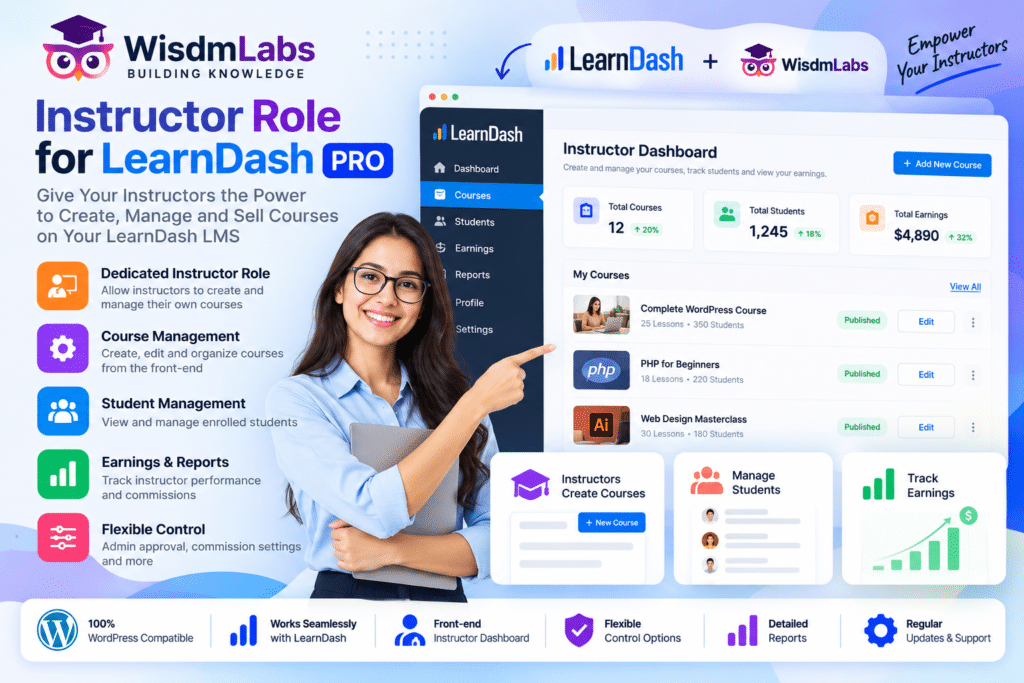
Instructors can work through a frontend dashboard, manage courses and quizzes, review student progress, grade assignments, track commissions, manage groups, and collaborate with other instructors.
This makes the plugin especially useful for academies, training businesses, course marketplaces, educational institutions, and LearnDash websites working with multiple teachers.
Key Features
- Dedicated Instructor Role – Give teachers restricted LearnDash-focused permissions without providing full administrator access.
- Frontend Instructor Dashboard – Let instructors manage important teaching activities without navigating the standard WordPress backend.
- Frontend Course Creation – Create and edit LearnDash courses through a simplified frontend workflow.
- Course & Quiz Management – Manage supported courses, quizzes, lessons, topics, and certificates.
- Multiple Instructors Per Course – Assign multiple instructors to collaborate on the same LearnDash course.
- Instructor Commissions – Configure percentage-based commissions for instructors selling paid courses.
- PayPal Payouts – Process supported instructor commission payments through PayPal Payouts.
- Course Reports – Let instructors monitor learner progress and course performance.
- Assignment Management – Review, download, score, approve, and grade supported learner submissions.
- Instructor Profiles – Create public instructor profiles containing biographies, courses, ratings, statistics, and social information.
- LearnDash Groups Management – Let supported instructors create and manage LearnDash groups.
- WooCommerce Product Management – Create and manage supported course products through the instructor dashboard.
- Student Communication – Give instructors tools for communicating with students enrolled in their courses.
- Course Approval Workflow – Allow administrators to review instructor changes before they are published where configured.
Perfect For
Instructor Role for LearnDash PRO is suitable for online academies, universities, coaching businesses, training companies, educational marketplaces, corporate learning platforms, professional instructors, multi-teacher websites, course creators, and businesses operating LearnDash with external instructors.
Create a Multi-Instructor LearnDash Platform
Standard LearnDash is powerful for creating courses, but websites working with many teachers often need more structured instructor permissions.
Instructor Role adds a dedicated role positioned between a regular user and a WordPress administrator.
Instructors receive access to the tools they need for their own courses while access to unrelated WordPress settings and other instructors’ content can remain restricted. WisdmLabs specifically describes this controlled-access model as a way to prevent instructors from interfering with broader LearnDash settings or courses belonging to others.
Manage Courses from the Frontend
The Frontend Course Creator lets administrators and instructors create and edit LearnDash courses without relying entirely on the WordPress backend.
Supported workflows include organizing course structures, adding lessons and topics, using existing content, and connecting quizzes to courses.
WisdmLabs also documents Elementor compatibility for the frontend course-creation workflow, allowing supported course content to be edited through Elementor while maintaining restricted backend access.
Build Custom Instructor Dashboards
The newer Wisdm frontend dashboard is built with Gutenberg blocks, giving administrators greater control over the instructor experience.
Available dashboard functionality includes supported blocks for:
- Instructor overview
- Courses
- Quizzes
- Instructor settings
- WooCommerce products
- Commissions
- Assignments
- Course reports
- LearnDash groups
Administrators can organize these blocks into tabs and customize dashboard layouts, typography, colors, actions, and navigation.
Track Instructor Performance
The Instructor Overview provides instructors with important information about their teaching activity.
Current WisdmLabs documentation includes:
- Number of active courses
- Enrolled students
- Assignments and essay submissions
- Quiz attempts
- Top-performing courses
- Instructor earnings
- Student course progress
- Recent assignment submissions
This gives instructors a centralized view of their courses without requiring access to broader WordPress administration areas.
Manage Instructor Commissions
For paid-course marketplaces, Instructor Role can calculate instructor commissions from course sales.
Administrators can configure percentage commissions for individual instructors, while the dashboard provides commission information and payout history.
Current WisdmLabs functionality also includes supported PayPal Payouts, allowing administrators to send eligible instructor commissions directly from the website.
Review Detailed Course Reports
Instructors can monitor learner performance for the courses they manage.
Course reports provide information such as enrolled learners and course progress, while supported report data can also be exported as CSV.
The newer frontend reporting blocks additionally provide course-level summaries, learner-specific reports, progress charts, filters, and detailed enrollment information.
Grade Assignments from the Dashboard
Instructor Role provides a frontend workflow for managing LearnDash assignments.
Instructors can review submissions associated with lessons and topics, filter them by student, date, or approval status, and perform supported actions such as:
- Downloading assignments
- Scoring submissions
- Approving assignments
- Grading work
- Reviewing comments
This can reduce the amount of backend access teachers require for day-to-day course administration.
Create Public Instructor Profiles
Instructor Profile functionality lets learners see more information about the teachers behind their courses.
Profiles can display supported information such as:
- Instructor biography
- Course statistics
- Student statistics
- Available courses
- Average course ratings
- Social information
Administrators can also create additional profile introduction sections for information such as education, achievements, qualifications, or other instructor details.
Share Courses Between Multiple Instructors
Courses do not have to be managed by only one teacher.
Instructor Role supports assigning multiple instructors to the same course, allowing subject-matter experts and teaching teams to collaborate on course management.
The administrator or primary instructor can assign other eligible instructors when responsibilities need to be shared.
Manage LearnDash Groups
Current frontend-dashboard functionality also includes LearnDash Groups management.
Supported instructors and administrators can create and edit groups, review courses and users assigned to a group, monitor group progress, and access supported export features.
This can be particularly useful for corporate training, cohort-based programs, schools, and larger educational platforms.
Build a Professional Multi-Instructor LMS
Expand LearnDash with WisdmLabs | Instructor Role for LearnDash PRO.
With restricted instructor permissions, frontend course creation, customizable dashboards, multiple instructors, commissions, PayPal payouts, assignments, detailed reporting, instructor profiles, WooCommerce product management, and LearnDash group tools, Instructor Role provides a powerful foundation for running a multi-teacher learning platform.