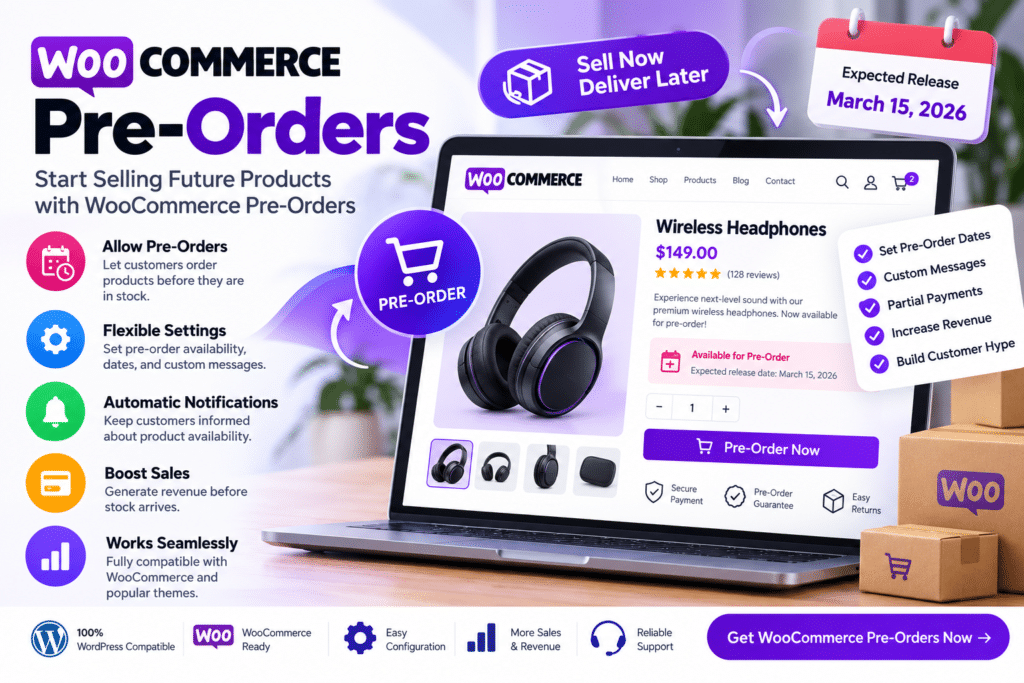
It allows store owners to prepare upcoming products in advance, collect customer interest, and manage supported pre-order workflows directly through WooCommerce. Depending on your setup, customers can place pre-orders for future releases while you control availability dates, pricing, and order processing.
Whether you’re launching a new product, accepting advance orders for limited stock, or preparing an upcoming collection, WooCommerce Pre-Orders provides a practical way to start selling before release day.
Key Features
- Accept Product Pre-Orders – Let customers order supported products before they become generally available.
- Release Date Management – Set supported availability or release dates for upcoming products.
- WooCommerce Integration – Manage pre-order products through your existing WooCommerce store.
- Advance Product Sales – Start collecting orders before inventory is officially released.
- Pre-Order Pricing – Configure supported pricing for products offered before launch.
- Customer Notifications – Keep customers informed about supported pre-order and release-related updates.
- Order Management – Manage pre-orders alongside regular WooCommerce orders.
- Automatic Release Workflow – Process supported pre-orders according to configured availability dates and settings.
- Product Page Messaging – Clearly communicate pre-order status and expected availability to customers.
- Limited Product Launches – Useful for new releases, special editions, seasonal items, and limited collections.
- Payment Workflow Support – Work with supported payment timing and gateway configurations.
- Pre-Order Reporting – Review supported pre-order activity through your WooCommerce environment.
- Customer Account Integration – Allow customers to view relevant pre-order information within supported account workflows.
- Flexible Store Applications – Use pre-orders for physical products, upcoming releases, and other compatible WooCommerce products.
Perfect For
WooCommerce Pre-Orders is suitable for fashion brands, electronics stores, book sellers, game stores, collectibles, product launches, seasonal businesses, limited-edition products, handmade goods, and other WooCommerce stores selling items before their official release.
Start Selling Before Launch Day
Product launches often generate interest before inventory is ready to ship.
WooCommerce Pre-Orders helps you turn that early interest into actual orders by allowing customers to reserve or purchase supported upcoming products in advance.
This can also give your business an early indication of demand, making it easier to plan stock, marketing, and launch activity around a new product.
Manage Product Launches with WooCommerce
Prepare upcoming products with WooCommerce Pre-Orders – Pre-Order Management Plugin.
With pre-order functionality, release-date controls, customer notifications, WooCommerce order management, pricing options, and payment workflow support, the extension provides a practical way to manage advance product sales directly from your online store