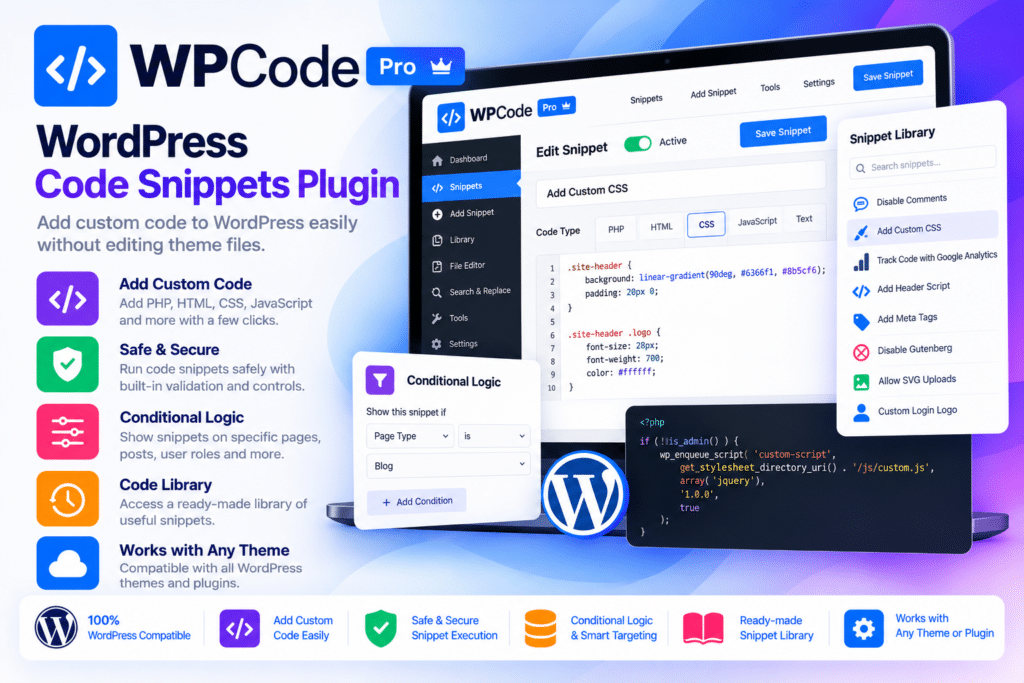
WPCode Pro is a WordPress code management plugin that makes it easier to add, organize, and manage custom code without directly editing theme files such as functions.php. Formerly known as Insert Headers and Footers, WPCode brings PHP, JavaScript, CSS, HTML, and text snippets together in one centralized dashboard.
Whether you need to add Google Analytics, install advertising pixels, customize website functionality, insert custom scripts, or make small design adjustments, WPCode provides a structured way to manage these changes. Its visual editor, automatic insertion locations, conditional logic, and code revision tools help simplify everyday WordPress development tasks.
The Pro edition expands the free plugin with advanced snippet management, scheduled execution, testing mode, cloud storage, page-specific scripts, access controls, and additional integrations. Its ecosystem also includes dedicated add-ons for conversion tracking, location-based targeting, and WordPress multisite management, depending on the available license.
For developers, agencies, and WordPress site owners who regularly work with custom code, WPCode Pro offers a centralized alternative to manually adding snippets across different theme and plugin files.
Key Features
1. Manage All Code Snippets in One Place
WPCode provides a centralized interface for managing custom code across your WordPress website. Instead of adding scripts and functions directly to theme files, you can create individual snippets, give them descriptive names, and control when they run.
This makes it easier to organize customizations and maintain them when changing themes or updating your website.
2. Support for Multiple Code Types
Create and manage different types of snippets using the built-in code editor.
Supported code types include:
- PHP
- JavaScript
- CSS
- HTML
- SCSS
- Text
This flexibility makes WPCode useful for everything from small styling changes to more advanced WordPress functionality.
3. Global Header and Footer Scripts
Add scripts, verification codes, tracking tags, and other integrations to your website’s header or footer without manually editing theme files.
Common uses include:
- Google Analytics tracking code
- Google Tag Manager
- Meta Pixel
- Website verification tags
- Custom JavaScript
- Third-party service scripts
You can manage these scripts from the WordPress dashboard and keep them separate from your active theme.
4. Advanced Auto-Insert Locations
Choose where a snippet should run using WPCode’s automatic insertion settings. Depending on the code type, available locations include the site header, footer, frontend, administration area, post content, and other supported WordPress locations.
You can also use manual insertion options such as shortcodes when you need to place a snippet at a specific position.
5. Smart Conditional Logic
Control exactly when a snippet should load by configuring conditional rules. Instead of running every script throughout your website, you can target selected pages, users, devices, and supported eCommerce conditions.
Examples include:
- Displaying code only on selected pages
- Running snippets for logged-in users
- Targeting specific user roles
- Loading scripts on selected post types
- Applying device-specific conditions
- Using supported WooCommerce and Easy Digital Downloads rules
- Scheduling snippets according to configured conditions
Advanced conditional rules require an eligible paid license, and some targeting options depend on additional add-ons.
6. Ready-Made Code Snippets Library
Access a library of pre-built WordPress snippets designed to help with common website customizations. Instead of searching for code and manually configuring every setting, you can select a suitable snippet and add it through the WPCode interface.
The library covers different types of WordPress improvements and can help reduce the need for separate plugins for simple functionality.
7. Built-In WordPress Code Generator
Create custom snippets through guided generator tools. Rather than writing every function from scratch, you can use supported generators to configure common WordPress customizations through form-based options.
This can be helpful for site owners who understand what they want to change but are less comfortable writing code manually.
8. Safe Error Handling and Safe Mode
Custom PHP code can cause website errors when it contains syntax problems or conflicts with other functionality. WPCode includes error-handling features designed to help prevent problematic snippets from leaving a website inaccessible.
Safe mode also provides a recovery option for troubleshooting snippet-related problems.
Important: Error handling is not a guarantee that every custom snippet is safe. Review code before activating it, especially when using PHP or code from an unverified source.
9. Advanced Code Revisions
Keep track of changes made to your snippets. WPCode Pro provides revision history so you can compare earlier versions and restore a previous configuration when necessary.
The revision system can also track changes to snippet settings, helping you understand what changed beyond the actual code.
10. Scheduled Snippets
Set snippets to activate or deactivate according to a schedule. This is useful when you want to run temporary campaigns, display seasonal functionality, or control when particular customizations become active.
Scheduling can help reduce manual work when managing time-sensitive website changes.
11. Advanced Testing Mode
Test snippet changes before making them visible to regular website visitors. Testing Mode provides a controlled workflow for checking customizations and preparing changes before publishing them across your website.
This is particularly useful for developers and agencies working on websites where unexpected code changes could affect visitors.
12. Private Cloud Snippet Library
Save snippets to your private WPCode Library and reuse them across connected WordPress websites. This can be useful when managing multiple client projects or maintaining a consistent set of customizations across several websites.
Eligible plans also support managing and deploying saved snippets through the WPCode Library.
13. Page-Specific Scripts
Add custom scripts to individual posts and pages instead of loading them globally. This is useful for landing-page tracking, page-specific integrations, custom styles, and scripts required by particular website sections.
You can manage page-specific code through the supported WordPress editing interfaces.
14. Gutenberg Block Integration
Use the WPCode block to insert supported snippets into Gutenberg content. This makes it possible to reuse custom code and content elements within the block editor without repeatedly copying and pasting the same code.
15. Custom Snippet Shortcodes
Generate shortcodes for supported snippets and place them inside posts, pages, and other shortcode-compatible areas.
Custom shortcode names make snippets easier to identify and reuse throughout your website.
16. SCSS Support
Manage SCSS code directly through the WPCode interface. This is useful for developers who prefer working with structured stylesheets rather than maintaining large collections of individual CSS rules.
17. WordPress File Editor
Manage supported website configuration files from the WordPress dashboard. Depending on the plan and permissions, WPCode provides file-editing functionality for files such as:
- ads.txt
- app-ads.txt
- robots.txt
- service-worker.js
Access controls allow administrators to manage which users can use the available file-editing features.
18. Access Control and User Permissions
Control which WordPress user roles can manage snippets and which types of code they can access.
Depending on the license, you can configure separate permissions for text, HTML, CSS, JavaScript, and PHP snippets. This is especially useful for agencies and teams that need to delegate website tasks without giving every user unrestricted code access.
WPCode Pro Add-ons
WPCode provides dedicated add-ons that extend its core code management functionality. Their availability depends on the subscription plan.
Conversion Pixels Add-on
<text>Connect your website with popular advertising and analytics platforms using the Conversion Pixels add-on.</text>
Supported platforms include:
- Facebook and Meta
- Google Ads
- TikTok
- Snapchat
The add-on can help configure tracking pixels, supported eCommerce events, and custom click tracking. Depending on the connected platform, you can also use supported server-side conversion tracking through API credentials.
It can detect supported integrations such as WooCommerce, Easy Digital Downloads, and MemberPress for relevant eCommerce events.
Location Add-on
Extend Smart Conditional Logic with location-based targeting. The Location add-on allows you to create rules based on a visitor’s country or continent.
This can be useful for displaying region-specific content, promotions, scripts, or marketing campaigns.
Multisite Add-on
Manage snippets across a WordPress multisite network from a centralized network-level interface. Network administrators can create snippets for multiple sites, control where network-level snippets run, and manage access permissions.
The Multisite add-on is available on the eligible Elite plan rather than every WPCode Pro subscription.
Who Should Use WPCode Pro?
WPCode Pro can be useful for:
- WordPress developers managing custom PHP and JavaScript
- Website owners adding tracking and verification scripts
- SEO professionals implementing structured data and custom scripts
- WooCommerce stores configuring conversion tracking
- Digital marketing agencies managing multiple websites
- Developers maintaining reusable code snippets
- Businesses that need page-specific scripts and custom functionality
- WordPress multisite administrators
Compatibility and Setup Notes
- Platform: Self-hosted WordPress
- Plugin: WPCode Pro
- Developer: WPCode
- Free companion: WPCode Lite
- Supported code types: PHP, JavaScript, CSS, HTML, SCSS, and text
- Editor integration: Gutenberg and supported WordPress editing interfaces
- eCommerce integrations: WooCommerce, Easy Digital Downloads, and MemberPress for supported tracking features
- Advertising integrations: Meta, Google Ads, Pinterest, TikTok, and Snapchat through Conversion Pixels
- Additional functionality: Location and Multisite add-ons on eligible plans
Important: WPCode Pro is a code management tool, not a guarantee that custom code will work with every theme, plugin, or WordPress installation. Test new snippets carefully, keep backups, and avoid activating PHP code from unknown sources.
Some advanced features are tied to a valid WPCode license. Conversion Pixels requires an eligible Plus-level plan or higher, Location-based rules require the Location add-on, and the Multisite add-on is restricted to the Elite plan. External advertising platforms may require their own account IDs, API tokens, and privacy configurations.
Free Version vs Pro Edition
The free WPCode plugin offers essential snippet management, header and footer scripts, basic insertion options, and access to the snippet library.
WPCode Pro expands these capabilities with advanced conditional logic, code revisions, scheduled snippets, testing mode, private cloud storage, page-specific scripts, additional access controls, and other advanced tools.
The add-ons extend the platform further with advertising conversion tracking, geographic targeting, and multisite management. Check the selected subscription or package to confirm which add-ons and premium features are actually included.
Manage WordPress Custom Code with Greater Control
WPCode Pro brings custom scripts, PHP functions, stylesheets, tracking pixels, and website customizations into one organized interface. Its conditional logic, automatic insertion locations, revision history, and reusable snippet library make it easier to maintain custom code across WordPress projects. For developers, agencies, and website owners who regularly customize WordPress, WPCode Pro offers a practical way to manage code without repeatedly editing theme files.