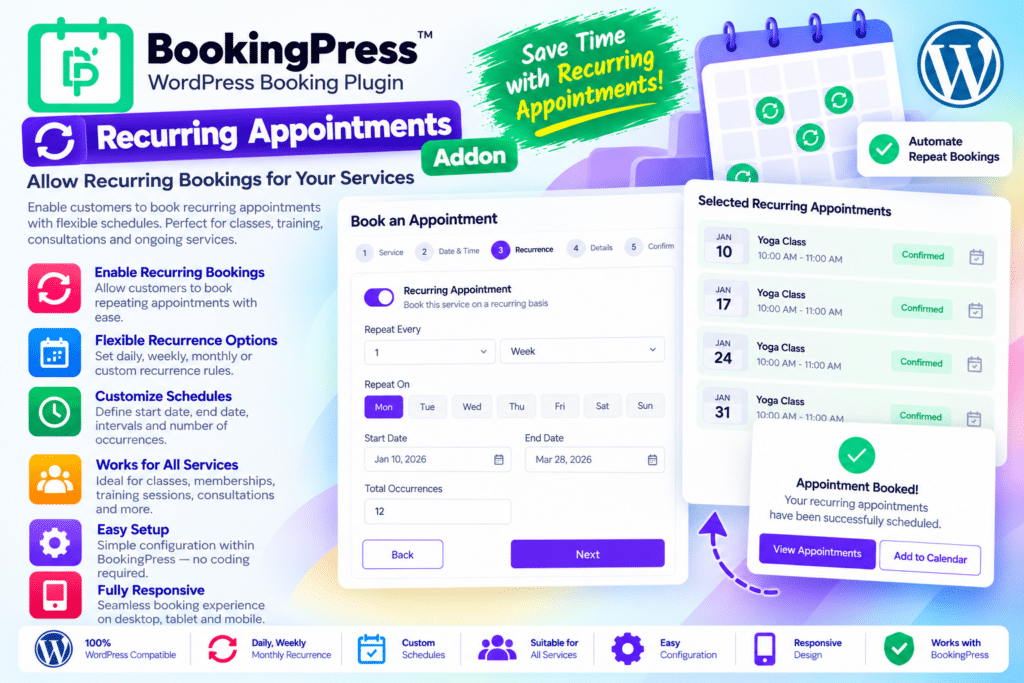
BookingPress Recurring Appointments Addon extends the BookingPress appointment booking plugin with a convenient way to schedule multiple appointments in a single booking session. Instead of booking each visit individually, customers can select a recurring frequency and reserve a series of appointments in advance.
The addon supports daily, weekly, biweekly, and monthly booking schedules, with configurable minimum and maximum session limits. Customers can choose their preferred starting date and time, review the proposed appointments, and pay for the scheduled sessions together using an available payment method.
Whether you run a salon, fitness studio, tutoring service, wellness center, or consulting business, this addon can simplify repeat bookings and help you organize your upcoming appointment calendar.
- Recurring appointment scheduling for selected BookingPress services.
- Daily, weekly, biweekly, and monthly frequency options.
- Configurable minimum and maximum appointment counts.
- Optional rules requiring customers to book recurring sessions.
- Automatic suggestions for alternative available time slots.
- A booking summary showing scheduled appointments and the total amount.
- Centralized recurring appointment management in WordPress.
- Customizable booking form labels, colors, and validation messages.
- Email and supported SMS or WhatsApp notification placeholders.
- Follow-up renewal reminders after a recurring appointment series is completed.
Key Features
- Recurring Bookings for Selected Services – Enable repeat appointment scheduling for the individual services that support recurring bookings.
- Multiple Frequency Options – Allow customers to schedule appointments daily, weekly, every two weeks, or monthly.
- Minimum Session Limits – Set the minimum number of appointments customers must book in a recurring series.
- Maximum Session Limits – Control the number of sessions customers can reserve in one recurring booking.
- Required Recurring Booking – Make recurring appointments mandatory for a service when customers must book a fixed or minimum number of sessions.
- Flexible Start Date and Time – Let customers select the starting date, preferred time slot, number of sessions, and recurrence frequency.
- Alternative Slot Suggestions – Suggest a nearby available time slot when the selected slot is unavailable, where the scheduling rules permit.
- Booking Summary – Display the scheduled appointment dates, times, service details, and combined amount before the customer confirms the booking.
- Single Payment for the Series – Allow customers to pay for the scheduled recurring sessions together through an available payment gateway.
- Centralized Appointment Management – View and manage recurring appointments from the BookingPress dashboard.
- Edit or Delete Scheduled Sessions – Make supported changes to recurring appointment series, including adjusting session counts and frequency.
- Customizable Booking Form – Adjust recurring appointment labels, colors, time-slot displays, and related validation messages.
- Recurring Appointment Notifications – Include recurring booking details in supported email notifications using the available placeholders and shortcode options.
- SMS and WhatsApp Integration – Display recurring appointment details in supported notifications when the relevant BookingPress notification addons are installed.
- Completion Follow-Up Reminders – Enable a notification encouraging customers to book again after all appointments in a recurring series are marked completed.
- Invoice Information – Use the provided recurring appointment shortcode in supported invoice templates to display information about recurring bookings.
Make Repeat Appointments Easier to Book
Customers who regularly visit a business should not have to repeat the entire booking process every time. BookingPress Recurring Appointments Addon makes it possible to schedule a series of sessions from one booking form.
For example, a customer booking weekly tutoring sessions can select a starting date, preferred time, and number of appointments. The addon then helps organize the requested sessions according to the configured frequency and available time slots.
This approach can save time for customers and reduce the administrative work involved in arranging repeat visits.
Keep Your Appointment Calendar Organized
Recurring bookings give service providers greater visibility into upcoming appointments. Rather than relying on customers to remember to book every week or month, you can organize future sessions in advance.
From the BookingPress dashboard, administrators can review recurring appointments and make supported adjustments when schedules change. This can be especially helpful for businesses that offer ongoing services, scheduled lessons, regular consultations, or repeat wellness sessions.
Availability still depends on your configured working hours, staff schedules, holidays, and existing bookings.
Let Customers Review and Pay for Multiple Sessions
Before confirming a recurring booking, customers can review the scheduled dates and times along with the combined amount for their appointments. This makes it easier to understand the commitment before completing payment.
The addon works with available BookingPress payment methods, allowing eligible customers to pay for the scheduled series in one transaction. Actual payment options depend on your payment gateway configuration and the booking setup.
For businesses that charge per session, this can provide a more straightforward way to collect payment for a planned series of appointments.
Encourage Customers to Book Again
Repeat customers are valuable to service-based businesses. BookingPress Recurring Appointments Addon includes a renewal reminder option that can notify customers after all appointments in a series have been marked as completed.
This gives customers a convenient prompt to arrange their next set of appointments. You can also configure supported email notification templates to include recurring appointment details and relevant booking actions.
SMS and WhatsApp notification behavior depends on the corresponding notification addons and their configuration. Review the official documentation to understand how immediate and scheduled notifications behave for your setup.
Who Should Use BookingPress Recurring Appointments Addon?
This addon can be useful for:
- Tutors and coaching businesses scheduling regular lessons.
- Fitness trainers and studios arranging recurring training sessions.
- Salons and spas managing repeat beauty and wellness appointments.
- Consultants and service providers offering regular client sessions.
- Therapists and wellness practitioners scheduling ongoing appointments.
- Music and language instructors organizing weekly or monthly classes.
- Booking website developers building appointment systems for businesses with recurring service needs.
Requirements and Compatibility
BookingPress Recurring Appointments Addon is an extension, not a standalone booking system. You need a compatible BookingPress installation and must activate the addon before configuring recurring appointments for your services.
After activation, open the relevant service settings, enable recurring appointments, and configure the minimum and maximum session counts along with the available frequencies. Review the booking form, payment options, notifications, and appointment management workflow before making the feature available to customers.
Important limitations to check before installation:
- Happy Hours pricing is not applied to bookings made with the Recurring Appointments Addon.
- Recurring appointments cannot be booked through the waiting-list slot.
- The addon does not work with Day Service or Custom Duration Service.
- When the BookingPress Cart Addon is active, recurring appointments can work with it, but multiple recurring appointment series cannot be stacked together in the cart and booked in one session.
Always check the current compatibility documentation for your installed BookingPress version and other active addons before deploying the feature on a live website.
Simplify Repeat Scheduling with BookingPress Recurring Appointments Addon
BookingPress Recurring Appointments Addon helps businesses organize repeat bookings, reserve multiple sessions in advance, and manage recurring schedules from one WordPress dashboard. Its frequency controls, appointment summaries, combined payments, and follow-up reminders make it a practical extension for businesses that depend on regular customer visits.
If your website already uses BookingPress and your services involve weekly lessons, monthly consultations, or other repeat appointments, this addon can make scheduling more convenient for both your customers and your team.