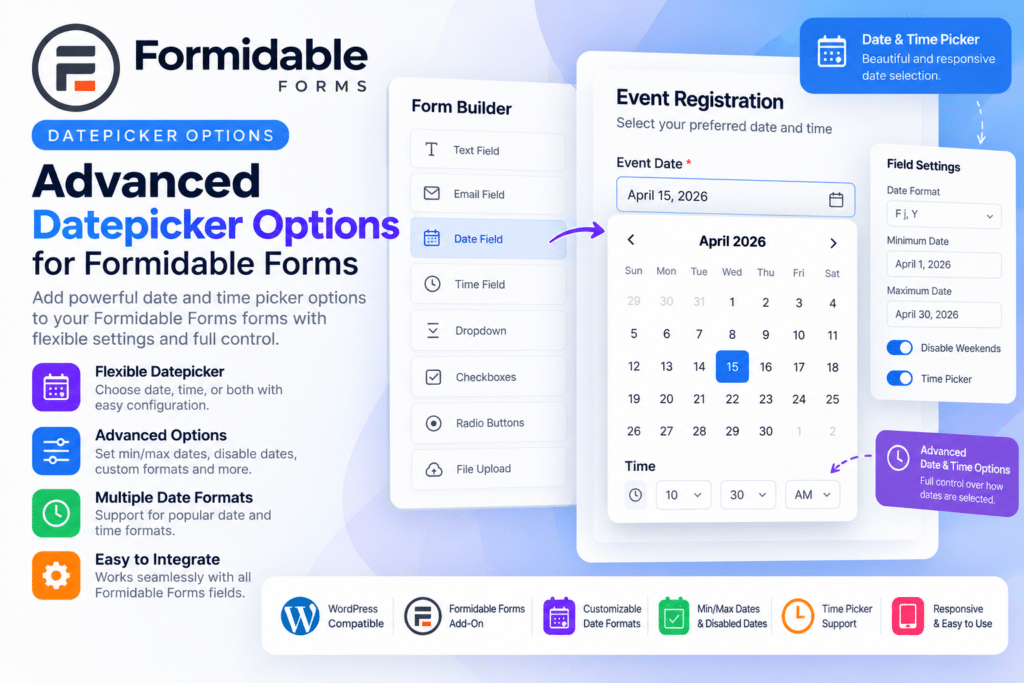
Formidable Forms Datepicker Options is an add-on designed to give you more control over date fields inside forms built with Formidable Forms.
It can help you customize which dates users are allowed to select, restrict unavailable days, define minimum or maximum date ranges, and create more practical scheduling or booking-style form experiences.
Whether you’re building appointment forms, event registrations, delivery forms, reservation requests, application forms, or any workflow that depends on date selection, Datepicker Options can make your forms more precise and user-friendly.
Key Features
- Advanced Date Restrictions – Control which dates visitors can select in supported date fields.
- Minimum Date Rules – Prevent users from selecting dates earlier than your configured limit.
- Maximum Date Rules – Restrict selections beyond a defined future date.
- Disable Specific Dates – Block holidays, unavailable days, or other dates that should not be selectable.
- Day-of-Week Restrictions – Allow or disable selected weekdays depending on your workflow.
- Relative Date Limits – Configure supported date rules based on today’s date or other dynamic references.
- Booking-Friendly Date Fields – Improve date selection for appointments, reservations, and service requests.
- Event Registration Use – Control valid registration or attendance dates for supported forms.
- Delivery & Pickup Scheduling – Restrict dates according to your available service days.
- Formidable Forms Integration – Extend existing Formidable Forms date fields rather than replacing your form workflow.
- User-Friendly Datepicker – Help visitors choose valid dates directly from the calendar interface.
- Flexible Form Logic – Combine supported date restrictions with other Formidable Forms rules and workflows.
- Responsive Experience – Keep date selection usable across desktop, tablet, and mobile devices.
- Business Workflow Support – Useful for forms where date availability needs to follow operational rules.
Perfect For
Formidable Forms Datepicker Options is suitable for appointment websites, event registrations, delivery services, rental businesses, booking forms, consultation requests, educational applications, service businesses, clinics, and other WordPress forms that require controlled date selection.
Make Date Selection More Reliable
Basic date fields can allow visitors to choose dates that your business cannot actually support.
Datepicker Options gives you more control over which dates are available, helping reduce invalid submissions and unnecessary follow-up.
For example, you can block weekends, prevent same-day bookings, limit reservations to a future range, or disable specific dates such as holidays.
Improve Your Form Scheduling Workflow
Add more control to your date fields with Formidable Forms – Datepicker Options.
With date restrictions, weekday controls, minimum and maximum ranges, unavailable date blocking, and Formidable Forms integration, the add-on provides a practical way to build more accurate scheduling and booking forms.