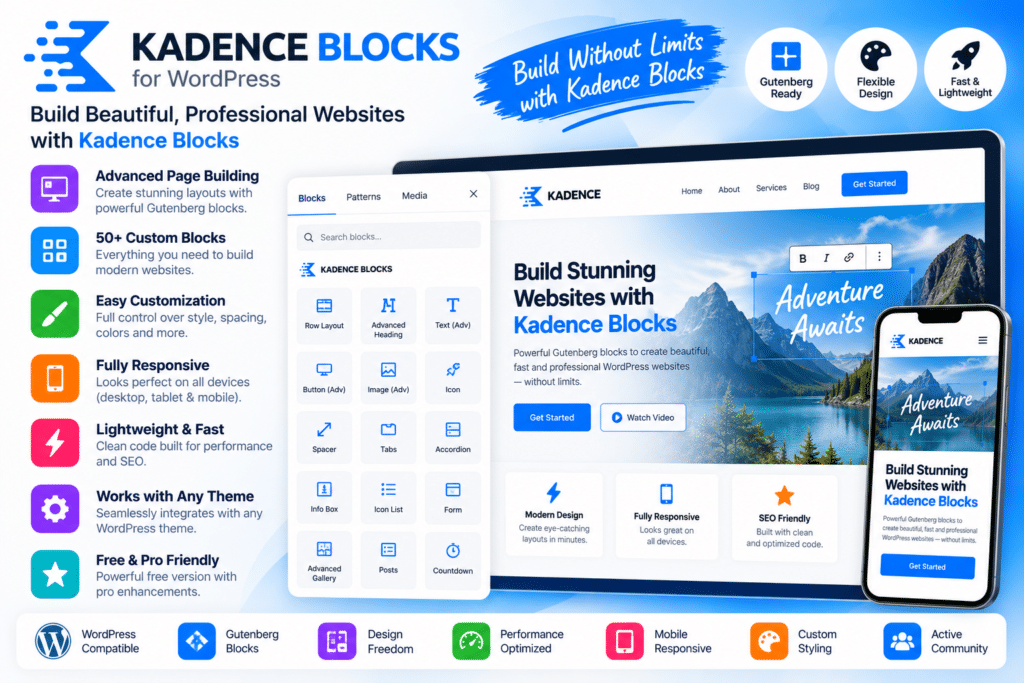
Kadence Blocks is a WordPress block editor plugin designed to extend Gutenberg with additional layout, design, and content-building tools.
It gives website owners, designers, bloggers, agencies, and developers more flexibility when creating pages directly inside the WordPress editor. Instead of relying only on the default Gutenberg blocks, Kadence Blocks adds extra controls for layouts, spacing, typography, responsive design, and supported content elements.
Whether you’re building landing pages, business websites, blogs, service pages, or WooCommerce content, Kadence Blocks provides a practical way to create more polished layouts while staying inside the native WordPress block editor.
Key Features
- Advanced Gutenberg Blocks – Add extra content and layout blocks to the WordPress editor.
- Row & Layout Controls – Build structured page sections with flexible column and spacing options.
- Responsive Design Settings – Adjust supported layouts and styling for desktop, tablet, and mobile devices.
- Advanced Heading Blocks – Create more flexible headings with improved typography and spacing controls.
- Button & CTA Elements – Add customizable buttons and action-focused sections.
- Icon & Info Blocks – Present features, services, and important information visually.
- Tabs & Accordion Elements—Organize supported content into compact interactive sections.
- Testimonial Blocks—Display customer feedback and reviews in polished layouts.
- Gallery & Image Controls – Create more flexible visual sections for images and media.
- Form Elements—Build supported contact or lead-generation forms directly with block-based tools.
- Typography Controls – Adjust supported fonts, sizing, line height, and text styling.
- Spacing & Design Options – Fine-tune margins, padding, borders, backgrounds, and other visual details.
- Reusable Block Workflows – Create consistent sections that can be reused across your website.
- WordPress Editor Integration—Work directly inside Gutenberg without switching to a separate page-builder interface.
Perfect For
Kadence Blocks is suitable for bloggers, agencies, freelancers, business websites, portfolio sites, WooCommerce stores, content creators, landing pages, service websites, and WordPress users who want more control over Gutenberg.
Build Better Pages with Gutenberg
The default WordPress block editor provides a solid foundation, but many websites need more control over layout and design.
Kadence Blocks extends Gutenberg with additional content blocks and responsive styling options, making it easier to create more polished pages without depending entirely on a traditional page builder.
This can be especially useful for users who prefer a lightweight, block-based WordPress workflow while still wanting greater design flexibility.
Extend the WordPress Block Editor
Create more flexible layouts with Kadence WP | Kadence Blocks.
With advanced Gutenberg blocks, responsive controls, typography settings, layout tools, interactive elements, and design customization, Kadence Blocks provides a practical toolkit for building modern WordPress pages.