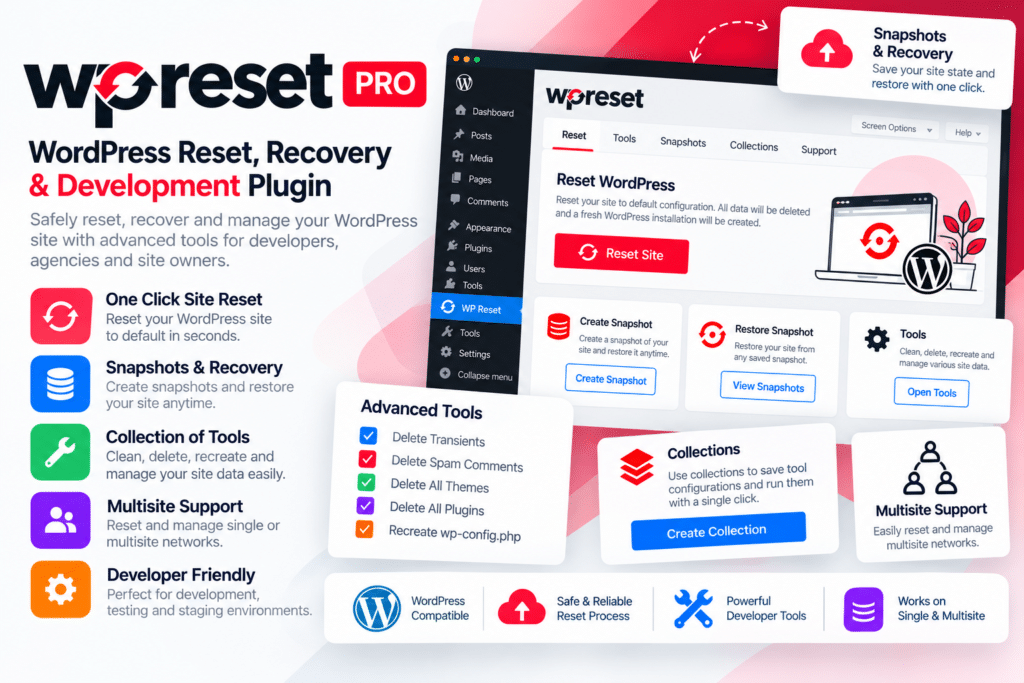
WP Reset Pro is a WordPress utility plugin designed for developers, agencies, testers, and site administrators who need faster ways to reset, clean, restore, and troubleshoot WordPress installations.
It provides several reset options, database snapshots, recovery tools, and reusable plugin/theme Collections that can simplify development, testing, staging, and site-recovery workflows.
Whether you’re repeatedly testing plugins, preparing demo sites, cleaning development environments, or recovering from a broken WordPress installation, WP Reset Pro provides a collection of tools for handling these tasks more efficiently.
Key Features
- Multiple Reset Modes – Use Options Reset, Site Reset, or Nuclear Reset depending on how much of the WordPress installation you need to clear.
- Database Snapshots – Create snapshots that can help you compare or restore supported database changes.
- Automatic Snapshots – Automatically create snapshots before selected reset tools, WordPress updates, or plugin and theme changes.
- Snapshot Restore – Return supported database states to an earlier snapshot when needed.
- Cloud Snapshot Support – Upload supported snapshots to WP Reset Cloud or compatible external storage workflows.
- Emergency Recovery Script – Access standalone recovery tools even when the WordPress admin area is unavailable.
- Core File Recovery – Scan supported WordPress core files and reinstall them through the Emergency Recovery Script when required.
- Plugin & Theme Control – Activate or deactivate supported plugins and themes during emergency recovery.
- Admin Account Recovery – Create a new administrator account through the recovery script when access has been lost.
- Collections – Create reusable groups of plugins and themes for faster installation on WordPress projects.
- Plugin & Theme Cleanup Tools – Remove selected plugins, themes, content, transients, widgets, and other supported data.
- Custom Table Tools – Empty or remove supported custom WordPress database tables.
- Development Workflow Support – Useful for testing installations where WordPress needs to be repeatedly restored to a clean state.
- Staging & Agency Features – Selected licenses can include additional staging and agency-oriented tools depending on the plan.
Perfect For
WP Reset Pro is suitable for WordPress developers, agencies, freelancers, QA testers, theme and plugin developers, staging websites, demo environments, client maintenance workflows, and administrators troubleshooting problematic WordPress installations.
Reset WordPress with More Control
Different situations require different levels of cleanup.
WP Reset Pro’s Options Reset can clear WordPress settings without removing normal content, while Site Reset returns database content to a default state without deleting files. Nuclear Reset is the most destructive option and removes database data as well as WordPress content files. Official documentation strongly recommends understanding each reset mode and making appropriate backups before destructive operations.
Snapshots can add another layer of protection to testing workflows. WP Reset Pro can automatically create snapshots before supported database-changing actions, plugin/theme changes, and updates, helping administrators compare or restore earlier states where applicable.
Recover Broken WordPress Websites
One of WP Reset Pro’s most useful tools is its Emergency Recovery Script.
This standalone script works independently of WordPress and can help when you cannot access wp-admin. Supported tools include scanning core files, restoring snapshots, controlling plugins and themes, creating an admin account, resetting WordPress URLs, repairing .htaccess, and disabling maintenance mode.
Speed Up Development with Collections
WP Reset Pro Collections let you prepare reusable groups of plugins and themes, including supported ZIP-based premium items, and deploy them to new WordPress installations more quickly.
Collections can be installed and optionally activated together, making them useful for agencies and developers who repeatedly create websites using a similar WordPress stack.
Simplify WordPress Reset & Recovery
Manage development and recovery tasks with WP Reset Pro – WordPress Reset, Recovery & Development Plugin.
With multiple reset modes, automatic snapshots, Emergency Recovery Script, Collections, cleanup tools, cloud workflows, and developer-focused utilities, WP Reset Pro provides a flexible toolkit for testing, troubleshooting, and maintaining WordPress websites.