
Skip to content
  • Premium Quality
  • 100% Safe & Clean
  • Lifetime Updates
  • 24/7 Support
USD INR
Facebook Instagram Linkedin X-twitter Whatsapp
  • Home
  • Themes
  • Plugins
  • Membership
  • Blog
  • Support
  • Home
  • Themes
  • Plugins
  • Membership
  • Blog
  • Support
🛒 0
login

WooCommerce Social Login – Social Sign-In Plugin

WooCommerce Social Login is an eCommerce extension designed to make customer registration and account access faster by allowing shoppers to
  • Instant download
  • Regular Updates
  • Safe & Checked Files
View Original
Support
Request Update

WooCommerce Social Login – Social Sign-In Plugin

₹ 236.13 - one-time

Checkout Added to cart

  • 🛡 Virus-scanned & clean
  • 🏅 Licensed under GPL — yours to keep
  • 🎧 One Year of support included
  • 🔒 Secure checkout
  • ↓ 0 downloads

Version history

1 release available — use the latest unless you need an earlier build.

  • v2.18.4 Current
    9 Oct 2026
  • Overview
  • Installation
  • FAQ

₹ 236.13

Checkout Added to cart

Overview

What you’re getting

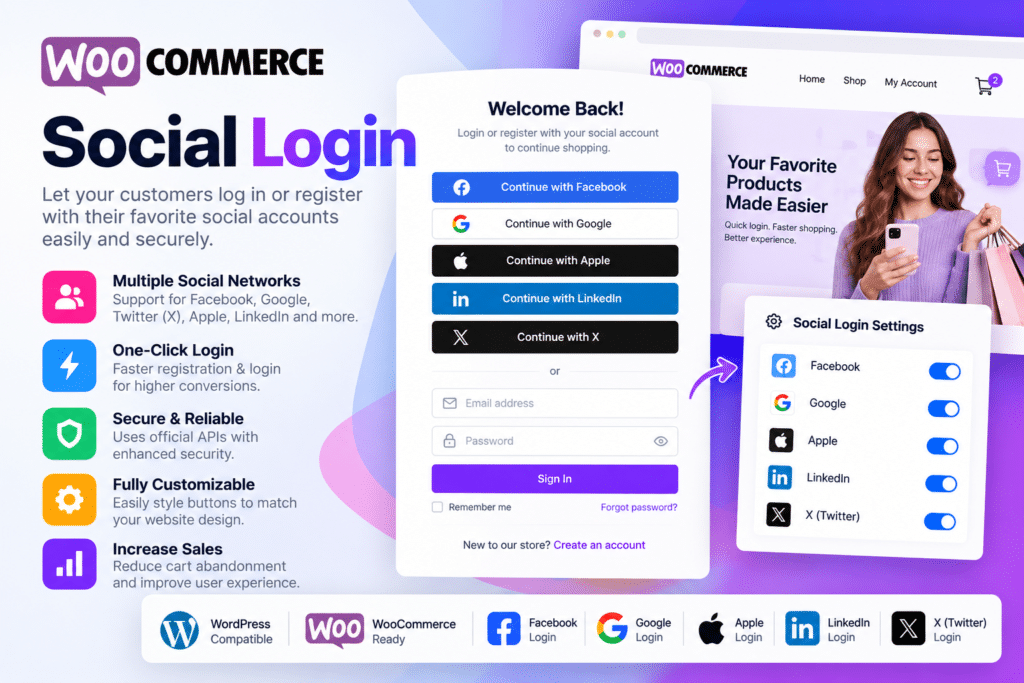
WooCommerce Social Login is an eCommerce extension designed to make customer registration and account access faster by allowing shoppers to sign in using supported social accounts.

Instead of creating and remembering another username and password, customers can connect an existing social profile to their WooCommerce account. This can simplify account creation and make returning to your store more convenient.

The extension currently supports Facebook, X (Twitter), Google, Amazon, LinkedIn, PayPal, and Disqus.

Key Features

  • Social Account Login – Let customers access your WooCommerce store using supported social networks.
  • Faster Account Creation – Reduce the steps required for new shoppers to create store accounts.
  • Google Login – Allow supported customers to sign in using their Google accounts.
  • Facebook Login – Connect supported Facebook profiles with WooCommerce customer accounts.
  • X (Twitter) Login – Provide supported login functionality using X accounts.
  • Amazon Login – Let eligible customers authenticate using their Amazon account.
  • LinkedIn Login – Support account access through compatible LinkedIn authentication.
  • PayPal Login – Enable supported PayPal-based customer sign-in.
  • Checkout Integration – Display social login options during supported WooCommerce checkout workflows.
  • My Account Integration – Add social login options to the WooCommerce My Account page.
  • Account Linking – Allow existing customers to connect supported social profiles to their WordPress account.
  • Order Received Page Linking – Invite customers to link a social account after completing an order.
  • Social Login Reporting – Review supported registration information based on connected social networks.
  • Shortcode & Widget Support – Display social login buttons in additional supported areas of your WordPress website.

Perfect For

WooCommerce Social Login is suitable for online stores, fashion shops, digital product businesses, subscription stores, electronics shops, beauty brands, membership stores, marketplaces, and other WooCommerce websites that want to simplify customer login and registration.

Reduce Friction During Checkout

Creating a new account can add another step between a shopper and completing an order.

WooCommerce Social Login gives customers the option to use an account they already have instead of creating another set of login credentials.

Returning customers who have linked a social profile can also use it to access their existing store account, helping create a smoother account and checkout experience.

Simplify WooCommerce Account Access

Improve the customer experience with WooCommerce Social Login.

With multiple supported social networks, checkout integration, My Account login, account linking, reporting, and flexible placement options, WooCommerce Social Login provides a practical way to simplify registration and customer account access.


Checkout Added to cart

Installation

Up and running in minutes

WordPress Plugin Installation

  1. 1

    Prepare the Plugin ZIP File

    Download the installable plugin ZIP file. If your download contains an outer package, extract it and locate the actual installable plugin ZIP.

    Prepare the Plugin ZIP File
  2. 2

    Upload the WordPress Plugin

    Log in to your WordPress dashboard. Navigate to Plugins → Add New Plugin → Upload Plugin. Choose the plugin ZIP file and click Install Now.

    Upload the WordPress Plugin
  3. 3

    Activate the Plugin

    After successful installation, click Activate Plugin. Complete any required configuration to start using the plugin.

    Activate the Plugin

Stuck on any step? Open a Support Ticket — we’re happy to help with installation.

FAQ

Questions, Answered

Is this the original product?

GPL NEST provides GPL-licensed WordPress products distributed under the applicable open-source license. We do not claim to be the original developer unless specifically stated.

How many websites can I use it on?

Usage depends on the product’s GPL license and the terms shown on the product page. Please review the product information before installation.

How do updates work?

When an updated version becomes available on GPL NEST, you can download it from your account according to your purchase or membership access.

Do I need a license key?

Some premium features that depend on the original developer’s license key, cloud service, API, automatic updates, or external account may not be included.

What if I have a problem?

Contact our support team if you have an issue with your download or installation. We’ll do our best to help.

GPL NEST MEMBERSHIP

Need More Than One Product?

Get access to thousands of WordPress themes and plugins with a GPL NEST membership.

View Membership Plans

RELATED PRODUCTS

Discover more WordPress plugins and themes that may be useful for your website.

SchedulePress Pro – WordPress Content Scheduling & Social Sharing Plugin

₹ 129.92
Checkout Added to cart

Out-of-the-Box | Dropbox plugin for WordPress

₹ 129.92
Checkout Added to cart

Use-your-Drive – Google Drive Plugin for WordPress

₹ 120.43
Checkout Added to cart

Max Addons Pro for Bricks

₹ 129.92
Checkout Added to cart

GPLNESTS is a marketplace for WordPress users, freelancers, developers, and agencies looking for premium GPL-licensed themes and plugins at accessible prices.

Our goal is simple: make useful WordPress tools easier to access, download, and use.

Facebook Instagram Linkedin X-twitter Whatsapp

Quick Links

  • Home
  • Themes
  • Plugins
  • Membership
  • Blog
  • Support
  • Home
  • Themes
  • Plugins
  • Membership
  • Blog
  • Support

Categories

  • WordPress plugins
  • Page Builders
  • WordPress plugins
  • Business WordPress Themes
  • WooCommerce Plugins
  • SEO Plugins
  • Security Plugins
  • Forms & SMTP
  • WordPress plugins
  • Page Builders
  • WordPress plugins
  • Business WordPress Themes
  • WooCommerce Plugins
  • SEO Plugins
  • Security Plugins
  • Forms & SMTP

My Account

  • My Account
  • Downloads
  • Orders
  • Wishlist
  • Support Tickets
  • Contact us
  • My Account
  • Downloads
  • Orders
  • Wishlist
  • Support Tickets
  • Contact us

We Accept :

100% Secure Payments

Your transactions are safe and encrypted.

© 2026 GPLNESTS. All Rights Reserved.

  • terms and conditions
  • Privacy Policy
  • Refund Policy
  • DMCA



